Features · Part 1 of 3

ClawBox hardware: quiet power for local AI

The chassis may be modest, but inside sits an NVIDIA Jetson Orin Nano — a module with the inference muscle to run serious models without a server room.

Compute

The Jetson Orin Nano at the core

The heart of the ClawBox AI hardware platform is the NVIDIA Jetson Orin Nano system-on-module. It pairs a 1024-core Ampere GPU with a six-core Arm Cortex-A78AE CPU, unified by 8 GB of 128-bit LPDDR5 memory. The result is a module that can sustain 67 trillion operations per second of AI inference while drawing a fraction of the power of a discrete GPU.

That number matters because it sets the ceiling on what the device can do locally. At 67 TOPS, the platform comfortably runs quantised 7B–13B parameter language models, streaming speech recognition and lightweight vision pipelines — and it can run several of these workloads concurrently without collapsing.

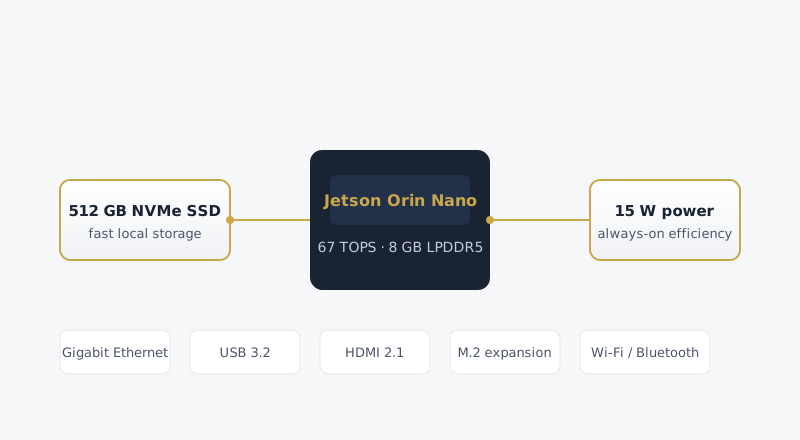
Diagram of the ClawBox hardware architecture showing the Jetson Orin Nano, NVMe SSD, power and port layout
Architecture overview: compute, storage, power and connectivity in one enclosure.

Storage that keeps up

Local AI is hungry for two things: model weights and conversation history. Both need fast, low-latency storage, which is why every unit ships with a 512 GB NVMe SSD rather than a microSD card. NVMe removes the I/O bottleneck that plagues cheaper single-board computers, so model loading is measured in seconds and retrieval over large personal archives stays snappy.

Fifty thousand megabytes may sound like more than a home assistant needs, but it is consumed quickly: a single 7B quantised model can occupy several gigabytes, a 13B model twice that, and a growing archive of documents, indexed messages and task logs adds up over the years. The capacity is chosen deliberately so the device remains useful for a long service life rather than asking you to manage space every few months.

A 15-watt, always-on envelope

Power consumption is the hidden cost of every always-on gadget. A traditional desktop can idle at 60–100 watts; a dedicated GPU rig far more. The ClawBox hardware is engineered around a 5–15 watt envelope, which means running it 24 hours a day costs roughly the same as leaving a couple of LED bulbs on. There is no fan noise to manage, no thermal throttling under sustained load, and no reason to schedule the device to sleep because the incremental cost of leaving it awake is negligible.

This is not a compromise on capability — it is the entire advantage of edge-AI silicon. The Jetson Orin Nano was built precisely for this kind of duty: dense inference in a power and thermal budget that fits in a living room, not a data hall.

Connectivity and expansion

  • Gigabit Ethernet — the recommended path for a stable, low-latency link to your router and the rest of the network.
  • Wi-Fi and Bluetooth — for placement flexibility and short-range peripherals where running a cable is impractical.
  • USB 3.2 and HDMI 2.1 — for local peripherals, secondary storage and a monitor if you ever want to work at the console directly.
  • M.2 expansion — a path for additional NVMe capacity or specialised accelerator cards down the line.

Thermals, enclosure and longevity

The enclosure is a compact aluminium-and-steel chassis sized for a shelf, a desk corner or a network cabinet. Passive cooling with a well-placed heatsink keeps the module well within its thermal limits for typical workloads, and the design is tolerant of the continuous, unglamorous duty of a device that never gets switched off.

Longevity is designed in from the start. Solid-state storage, no moving parts and conservative thermals mean the hardware is intended to run for years without intervention. The open-source software layer is updated separately, so the same enclosure can keep receiving new capabilities long after purchase.

How it compares

Benchmark-oriented buyers will want to see how the platform sits against other edge-AI options. Independent reviews of the Jetson Orin Nano module itself — its throughput, memory bandwidth and thermal behaviour — are widely published, and community benchmarks give a realistic picture of tokens-per-second performance across model sizes. For a dedicated teardown of the module family and its positioning, the analysis over at jetson-orin-ai.com is a useful companion read.

In practical terms, what separates the ClawBox AI hardware platform from a bare developer kit is that all of this — the module, storage, enclosure, power supply and the complete OpenClaw software image — arrives as one finished, tested product. You spend your hour configuring the assistant, not hunting for compatible parts.

Key specifications

  • Compute: NVIDIA Jetson Orin Nano 8 GB (67 TOPS)
  • Memory: 8 GB LPDDR5, 128-bit
  • Storage: 512 GB NVMe SSD
  • Power: 5–15 W
  • Networking: Gigabit Ethernet, Wi-Fi, Bluetooth
  • Ports: USB 3.2, HDMI 2.1, M.2 expansion
Deep dive

Understanding the silicon inside

The CPU and GPU cores

The Orin Nano module combines a six-core Arm Cortex-A78AE CPU with a 1024-core Ampere-generation GPU. The CPU handles orchestration — routing requests, managing tools, serving the dashboard — while the GPU does the heavy lifting of tensor operations that underpin modern AI inference. Splitting the work this way means a chat request never stalls behind a background job, because the two kinds of work run on different silicon.

The 8 GB of LPDDR5 memory is unified, meaning the CPU and GPU share a single pool rather than copying data across a slow bus. For AI workloads that routinely move large tensors around, this shared-memory architecture is a real advantage: it reduces latency and leaves more of the memory bandwidth available for the model itself.

Memory bandwidth and why it matters

Inference speed is frequently bound not by how many operations a chip can do, but by how quickly it can feed data to the compute units. The Orin Nano's 128-bit memory interface provides the bandwidth to stream model weights efficiently, which is why quantised models feel responsive here even though the raw TOPS figure is modest by data-centre standards. Bandwidth, not headline TOPS, is often the better predictor of real-world tokens per second.

Power modes and thermal behaviour

The platform ships in a balanced power mode by default, but it can be tuned between a 5-watt efficiency setting and a 15-watt maximum-performance setting from the dashboard. Most users never need to touch this — the default is chosen to be quiet, cool and responsive for everyday use — but the option exists for those who want to trade a little power for maximum throughput during a batch job, or a little throughput for the absolute lowest energy draw.

Thermally, the design is deliberately conservative. The passive heatsink keeps the module comfortably within its operating range under sustained load, with no fan and therefore no mechanical noise. It is a device you can put in a bedroom or an office and forget it is there, which is exactly what an always-on appliance should feel like.

What the hardware runs best

To set expectations precisely: the device excels at quantised 7B and 13B language models, streaming speech-to-text, document summarisation and retrieval over personal archives. It can run several of these concurrently within its memory budget. It is not positioned for training models or for running the largest open-weight releases at full precision — those remain the territory of far more expensive, far more power-hungry systems.

That focus is a feature, not a limitation. The overwhelming majority of personal AI use — asking questions, drafting text, summarising documents, automating routine web tasks — fits comfortably within this envelope, and it is served instantly, privately and at a cost measured in single-digit watts.

Design notes

Why the hardware looks and feels the way it does

Industrial design is easy to dismiss as cosmetic, but on an always-on appliance it is functional. The enclosure is deliberately unassuming — a compact, matte chassis in a navy finish with a single subtle gold accent — because a device that lives in a living room should not demand attention. It should sit quietly, run cool and get out of the way.

The choice of a passive cooling path rather than a fan follows the same logic. Fans are the first component to fail, the first to collect dust and the only source of mechanical noise in an otherwise silent device. A well-engineered heatsink and a conservative thermal envelope mean the hardware stays quiet for its entire life, with one less thing to wear out.

Ports are laid out for the way the device is actually used: Ethernet and power on the rear for a clean cable run, with the frequently-accessed USB and HDMI on an accessible edge. There is nothing clever about it, and that is the point — the physical design should disappear into the background so the software can do its job.

Durability was a design requirement, not an afterthought. Solid-state storage, no moving parts and a chassis that survives being moved between rooms or tucked into a cabinet all contribute to a product that is meant to be owned for years, not replaced on a cycle. It is the physical expression of the same permanence that defines the software.