Features · Part 2 of 3

ClawBox software: an open agent that runs on your own silicon

Beneath the polished surface is OpenClaw — an open-source agent core that turns the hardware into a genuinely private, offline-capable assistant.

The agent core

OpenClaw: open source, local first

The software stack is layered on a foundation of open-source components, with OpenClaw as the orchestrator that ties them together. It manages model loading, prompt routing, tool execution and the stateful memory that lets a conversation feel continuous rather than stateless.

Because it is open source, the behaviour is fully auditable. If you want to know exactly how a document is indexed, how a prompt is constructed or how an automation is scheduled, the answer is in the source — not hidden behind a proprietary API. That transparency is a deliberate design choice, not an afterthought.

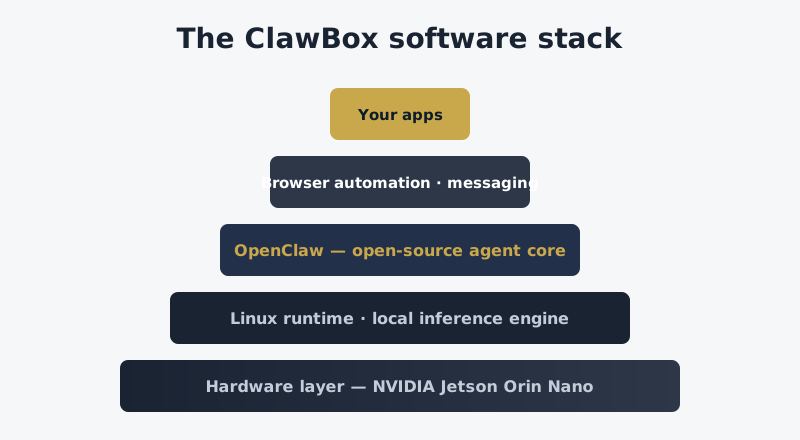
Layered diagram of the ClawBox software stack from hardware to apps
From silicon to your apps: the layered software architecture of the platform.

Local models, real privacy

The most important property of the ClawBox software is where it runs its models: on the device, not in the cloud. Open-weights language models — typically quantised 7B to 13B parameter variants — are loaded into the Jetson module's memory and served by a local inference engine. A prompt you type is tokenised, processed and answered without a single packet leaving your network.

This has three practical consequences. First, your conversations are private by construction; there is no server log, no training pipeline and no third party with a copy of your writing. Second, the assistant keeps working when your internet connection drops — genuinely useful for homes in rural areas, for travel, or for anyone who simply wants their tools to keep functioning through an outage. Third, the per-token economics disappear entirely: there is no metering because there is no meter.

Browser automation

A distinctive capability of the platform is its headless browser automation. The agent can drive a real browser engine to fill in forms, scrape structured data, monitor a page for changes and execute multi-step workflows that would otherwise consume your afternoon. This is the difference between an assistant that only talks and one that actually does things on the web.

Automation runs deterministically and locally, with the same privacy guarantees as the language features. A scheduled job that checks a price, a stock level or a document change runs on your hardware, at your chosen cadence, and reports back through whichever messaging channel you have connected.

Memory that persists

Stateful memory is what turns a sequence of one-off questions into an assistant that knows you. The device indexes your documents, retains conversation context and builds a searchable archive on the local NVMe drive. Because that archive is yours, you can export it, back it up or delete it at any time — controls that hosted services rarely offer with the same clarity.

Retrieval over this personal archive is one of the platform's strongest everyday features: ask a question about something you discussed weeks ago, and the agent can pull the relevant passage rather than guessing. The combination of local storage and local inference makes this fast, private and entirely self-contained.

Privacy and security posture

  • No telemetry by default — the device does not phone home, and you can keep it fully air-gapped if you choose.
  • Local encryption — your archive is stored on hardware you physically control.
  • Auditable code — open source means the security model is reviewable, not taken on trust.
  • No vendor lock-in — export your data, swap models, or run alternative open-source tooling on the same silicon.

Extending the platform

Because the device runs a full Linux environment, the ceiling is essentially open. Developers can write custom automations, add model backends, expose the REST API to their own applications or integrate the assistant with home-automation systems. The open-source licence and standard interfaces mean the investment you make in customising the device is not trapped inside a proprietary ecosystem.

For a broader perspective on how dedicated AI hardware fits into a modern self-hosted stack — and how different agent platforms compare — the discussion at ai-agent-hardware.com is a useful reference point. What distinguishes the ClawBox device in that landscape is its packaging: the software and hardware arrive as one coherent, tested whole rather than a kit of parts you must assemble yourself.

Software highlights

  • OpenClaw agent core (open source)
  • Local inference for 7B–13B quantised models
  • Headless browser automation engine
  • Stateful, exportable memory archive
  • Full Linux environment underneath
Under the hood

How the local-first architecture works

Choosing and swapping models

One of the quiet advantages of open-weights models is choice. The platform ships with a sensible default, but the dashboard lets you switch between supported models to balance speed, quality and memory. A lean 7B model gives you snappy everyday responses; a larger 13B model trades a little latency for richer reasoning on harder prompts. Because the models are stored locally, switching is a matter of loading a different set of weights — no account, no approval and no vendor deciding which models you are allowed to run.

This matters more than it first appears. Cloud assistants quietly change the model behind your back, and the quality of your answers can shift from one week to the next without your consent. With a local device, the model is a file on your disk. You can pin a version, compare alternatives, and know that the assistant you calibrated last month is the same assistant you are using today.

How prompts stay private

The privacy story is structural, not aspirational. A prompt you type is tokenised on the device, run through the local inference engine, and answered from the same hardware. The only network traffic is between your device and the assistant's web UI on your own LAN — or through a tunnel you explicitly configure for remote access. There is no telemetry server, no usage dashboard in the cloud, and no third-party model API in the request path. If you unplug the network cable, the assistant keeps answering.

Retrieval and the personal archive

The stateful memory system indexes the documents and conversations you choose to add, building a searchable archive on the local NVMe drive. When you ask a question, the agent can retrieve relevant passages and ground its answer in your own material rather than inventing from thin air. This retrieval-augmented approach is what makes the assistant feel like it knows you, and because the index lives on your hardware, it can grow without ever being scanned by anyone else.

Automation, end to end

Automation is where the platform stops being a chat window and starts being an employee. A typical flow combines several of the device's capabilities: a scheduled trigger fires, the agent opens its headless browser, collects structured data from a page, summarises it with a local model, and pushes the result to your messaging channel. The entire pipeline runs on the device, on a schedule you define, with no cloud service orchestrating the steps.

Because every stage is local and inspectable, automations are also auditable. You can see exactly what the agent did, what it read and what it wrote. That transparency is rare in automation platforms, which usually present a finished result with no visibility into the machinery — and it is essential when the agent is acting on your behalf with real accounts.

Security fundamentals

Security posture begins with the fact that there is far less to attack. A local device has no customer database in the cloud to breach, no account portal to phish, and no incentive for an attacker to target an individual home. Access to the device is controlled from your own network, software updates are signed, and the open-source codebase means the security model is open to review rather than reliant on obscurity. For a device that handles personal material, this is the right foundation.
Real-world examples

What owners actually use the software for

Spec sheets describe what a device can do; usage describes what it is actually good for. In practice, owners tend to settle into a handful of durable patterns that, taken together, explain the product's appeal far better than any feature list.

Drafting and correspondence

The most common use is simply writing. Because the assistant is private, people are willing to paste real material — a difficult email, a contract clause, a personal statement — and iterate until it is right. The quality bar is not that the model is the best available; it is that you can be completely candid with it without a second thought.

Summarising a reading backlog

A close second is taming the pile of things to read. Owners point the device at saved articles, reports and documents and let the local model compress them into useful summaries. The retrieval layer then lets them ask follow-up questions across the whole archive, which turns a scattered backlog into a queryable memory.

Web automation as a silent worker

The headless browser earns its keep on the tedious, recurring web tasks that eat an afternoon: checking availability, monitoring prices, filling repetitive forms and collecting data across several pages. Once scheduled, these run without supervision and report back through messaging — the closest most people come to having a genuine employee in a box.

What these patterns share is that none of them requires a frontier model. They require an assistant that is available, private and persistent — exactly the qualities the platform is built to deliver.