Features · Part 3 of 3

ClawBox integrations: one assistant, every surface you use

Your AI should meet you where you already are. The platform speaks Telegram, WhatsApp, Discord, the web and a clean REST API.

Multi-platform

A single assistant, many doors

The value of an assistant collapses if you have to remember where to find it. That is why the ClawBox AI hardware platform is reachable from the messaging apps you already keep open all day, with a shared memory across all of them. Start a task on your phone, continue it from your laptop, and the context follows you.

Each channel is a thin front-end to the same local agent, which means the behaviour — the models, the automations, the memory — is identical everywhere. There is no fragmented feature set where one platform can do things another cannot.

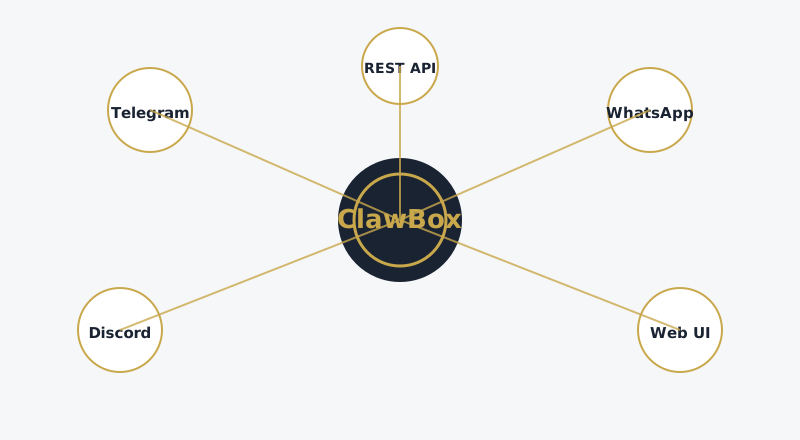
Map of platforms connected to the ClawBox device: Telegram, WhatsApp, Discord, Web UI and REST API
Every channel is a doorway to the same local agent and the same memory.

Telegram

Telegram's open bot API makes it the natural first-class citizen. The assistant appears as a normal contact, accepts natural-language requests, delivers scheduled reports and pushes notifications for the automations you have configured. Because the protocol is well documented, the integration is deep rather than superficial — inline commands, long-running tasks and media handling all work as you would expect.

WhatsApp

For households and teams where WhatsApp is the default, the platform provides a messaging bridge that keeps the assistant reachable without forcing anyone to install new software. The same assistant that drafts a document on the web can send a summary into a WhatsApp chat, so the output lands where the people are, not where the tool is.

Discord

Discord integration is aimed at power users and communities. The assistant can join a server, respond to mentions and run automation inside channels, which makes it useful for everything from personal task tracking to lightweight community moderation and knowledge retrieval. The event-driven nature of Discord suits scheduled reports and background jobs particularly well.

Web dashboard

The responsive web interface is the control centre. It provides a clean view of conversations, a place to configure automations, access to the document archive and visibility into what the agent is doing right now. Because it runs on your local network, the dashboard is reachable from any device in the house — and, if you choose, remotely through a secure tunnel of your own making.

The REST API

For developers, a documented REST API exposes the assistant's capabilities to anything you build yourself. Send a prompt, retrieve an answer, trigger an automation or query the archive from a script, a home-automation hub or a custom application. The API is the same surface the messaging channels use internally, so there is no second-class integration path.

This is where the platform opens up into a general-purpose automation engine. A small script can, for example, ask the assistant to summarise an overnight batch of emails and push the result into a channel — all running on hardware you own, on a schedule you define, with no cloud dependency in the loop.

Automations and scheduling

  • Scheduled reports — daily digests, price checks and change monitors delivered on a fixed cadence.
  • Event triggers — act when a page changes, when a keyword appears, or when a task completes.
  • Cross-channel delivery — produce output once and route it to any or all connected platforms.
  • Background jobs — long-running work that continues whether or not you are watching.

Bringing it together

Individually, each integration is useful. Together they make the device feel less like a gadget and more like a permanent part of your infrastructure — an assistant that is simply present, wherever you happen to be working. That is the standard the whole product is built to: not a tool you visit, but a layer of capability that follows you.

If you are weighing a dedicated AI hardware purchase against a cloud subscription, the difference comes down to exactly this surface area. A cloud assistant lives behind a single app; a local one lives on your network and reaches into every tool you already use. For a full product overview, the official site describes the dedicated AI hardware in detail.
In practice

How the integrations work together

A day with the assistant across channels

The clearest way to understand the multi-platform design is to follow a typical day. In the morning, a scheduled report lands in your Telegram with an overnight summary of the documents and pages the assistant was monitoring. At lunch, you ask a follow-up question from the web dashboard on your laptop, and the assistant already has the context from the morning's report. In the evening, you send a quick voice-style message from WhatsApp and receive a drafted reply to an email you have been putting off. The memory is shared, so each surface feels like the same person.

This continuity is the product of a single agent core with a single archive. There is no synchronisation to configure and no drift between platforms, because there is only one instance of the assistant — every channel is simply a different window onto it.

Why Telegram leads

Telegram's open bot API allows a depth of integration that closed messaging platforms rarely match. The assistant supports rich interactions beyond simple text: inline commands, buttons, media handling and long-running tasks that report back when they finish. For power users who want the assistant to feel like a native part of their messaging rather than a bolt-on, Telegram is where the platform is most expressive.

WhatsApp for everyone else

The reality of messaging is that many households and teams are not going to switch apps for a new gadget, and they should not have to. The WhatsApp bridge is built around that principle: the assistant meets people where they already are, with no new account and no new habit. Output is formatted for WhatsApp's constraints, so a summary or a drafted message reads cleanly on a phone screen.

Discord for communities and automations

Discord's event-driven model suits automation especially well. A server can receive scheduled digests into a channel, let members query the assistant with mentions, and route moderation or knowledge-retrieval tasks through the same agent. For communities that already live in Discord, this turns a single device into a shared, private assistant for the whole group — without exposing anything to a public cloud service.

Building on the API

The REST API is the platform's open door. Because the messaging channels are themselves implemented on top of this same API, anything a chat surface can do, your own code can do too. A developer might wire the assistant into a home-automation hub so that a spoken command triggers a document search, or build a custom reporting script that queries the archive nightly. The API is documented, versioned and stable, so integrations built today keep working as the software evolves.

For teams and developers, this is the point at which a local assistant becomes genuinely embedded infrastructure. It is not a separate destination you visit; it is a capability your existing systems can call.

Privacy across every channel

A common worry is that connecting a private device to a messaging platform leaks data back to that platform. In practice, the assistant processes everything locally and only sends the finished response to the channel — the same message you would have typed yourself. Your full conversation history and document archive never leave the device. The channel sees the output, not the internals.

Choosing channels

Which integrations should you actually set up?

You do not need every channel connected, and most owners settle on one or two. The useful guidance is to start with the surface you already spend the most time in, then add others only when a specific need appears. The assistant behaves identically everywhere, so nothing is lost by starting small.

For individuals

If you live in Telegram, connect Telegram. If your family communicates on WhatsApp, connect WhatsApp. The web dashboard is always there as a full-featured control centre regardless of which messaging channel you choose, so you are never locked out of the advanced controls even if you only pair one chat surface.

For teams and communities

Discord makes the most sense when a group shares the assistant — for scheduled digests into a channel, shared knowledge retrieval or lightweight moderation. For a business, the REST API is often the more important integration, because it lets existing internal tools call the assistant directly rather than routing everything through chat.

A note on setup effort

Every integration is designed to pair in minutes with no coding. The documentation walks through each one with screenshots, and the support team is happy to help with the rare edge case. Adding a channel later is just as easy as setting one up on day one, so there is no penalty for starting minimal and expanding as you learn the platform.